



IN THIS BLOG
Historically, virtual labs have had an answer for cost. It’s time.
Virtual Lab platforms make costs predictable. A lab runs for two hours, so it costs two hours.
Sessions have time limits, idle environments shut themselves down, and everything is torn down at the end rather than left running over a weekend.
AI in labs changes the dynamic, as now costs have more variables to manage. How experienced the user is with AI, what model is used, and what’s the scope of work.
Reason 1: AI spend scales with the work, not the clock
Deloitte’s analysis of AI token economics describes AI cost as volatile and non-linear by design, scaling with reasoning and workload rather than with headcount or session length.
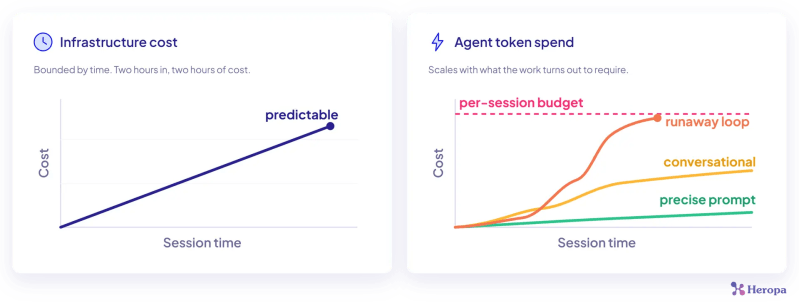
That’s the part that catches teams out. Everything else in a lab scales with how long it runs and how many people run it. Tokens scale with whatever the work turns out to require.
Reason 2: Two people on the same task use AI differently.
One writes a precise instruction and gets a result in three steps. The other has a conversation, changes their mind twice, and asks the agent to try again. Same lab, same exercise, different token bills.
One bad prompt can open a loop. An agent that misreads a goal will keep working at it, and multi-step reasoning means it can spend a lot doing so. A runaway loop can hit the usage or spend cap before anyone notices it started.
The models used matter too, the same query costs more if answered by a frontier model like Claude Fable 5 than by a smaller one. Agents don’t economize on your behalf yet, and in some cases popular tools default to the strongest model available
Reason 3: Monthly caps aren't the solution
If AI access in labs runs on a shared key or a corporate account, the spend arrives as one number on a provider invoice, weeks later, with no way to split it by course, cohort, customer or deal.
You can tell that AI costs you something, but you can’t tell which programme is expensive, whether a course got cheaper when you switched models, or what it would cost to run the same enablement twice next quarter.
The AI spend you can control today
An agent session is unpredictable by nature. The parameters around it are yours to set. Here’s four things worth exploring:
- A spend limit per session. The limit attaches to each environment rather than to a month or a cohort. If a lab is worth a few dollars of AI usage, that’s the number, and it applies to each environment launched from that template. Thirty learners can’t collectively surprise you, because thirty ceilings were set before the class began. One learner exhausts their allocation, everyone else carries on, and you find out from a pattern rather than an outage.
- Which models are allowed. A course that only needs a small model shouldn’t have access to your most expensive one. It’s the cheapest lever available and almost nobody pulls it.

- How long access lasts. This isn’t the same thing as the lab’s runtime. AI access that expires with the session means an environment left open overnight isn’t an open tab on your provider account.
- Whose account pays. Decide deliberately rather than by default, because it determines who carries the volatility. That question runs into the credential problem, which we’ve covered separately.
AI API Key Spend FAQs
How do I manage token spend?
Manually, you can set the ceiling per session rather than trying to police usage. A per-session budget means each environment launches with its own allocation, enforced before requests reach the provider, so a learner who loops or over-explores exhausts their own allocation and nobody else’s. Restricting which models the lab can call is the other half of it, because model choice usually moves the number more than the amount of usage does.
How much AI budget does a learner need for a lab?
It depends on the exercise and the model, so the practical approach is to run the lab yourself, look at what a thorough attempt consumes, then set the ceiling with headroom above it. A few dollars covers a lot of small-model work. An agentic coding exercise on a more powerful model is a different order.
Why can't I just use a time limit to control AI costs?
Because AI cost doesn’t scale with time. Two people can consume amounts that differ significantly depending on how they work and which model answers. Time limits are still worth having. They just aren’t a cost control for AI.
What happens when a learner hits their AI spend limit?
AI calls stop being authorized. The lab itself keeps running, so the environment, the software and everything else in the exercise are unaffected. How that surfaces depends on the tooling, because some agents report a clear error and others fail in ways that look like a broken lab, which is worth testing before a cohort rather than during one.
Can I see what AI spend a training cohort used?
Only if spend is issued per session in the first place. A shared key produces a single provider invoice with no breakdown, so cohort-level cost has to be estimated. When each session draws on its own allocation, the usage is already attributed to the environment, the course and the person who ran it, and reporting becomes a matter of grouping what’s already there.
Is AI spend in a lab a finance problem or a security problem?
Security doesn’t want corporate AI API keys sitting in an environment handed to someone outside the company. Finance cares if that usage is unpredictable and unattributable.


